

- Model evaluation: how to estimate the model’s future performance on unseen data
- Hyperparameter tuning: how to best select certain parameters of the model that are not directly learned from data
Introduction
To begin with, let’s clarify the scope of this article. Firstly, we will talk here about supervised ML models mostly; i.e. models which given some samples, each described by a set of features, and corresponding labels, will predict unknown labels for samples it hasn’t seen before. So this could be a model learning from past bank customer’s financial behaviour to predict a person’s credit risk (numerical prediction / regression); or a model predicting whether or not an image contains hot dogs (classification). Secondly, what we mean by model evaluation is estimating how good our model will be at predicting future, unseen data. To do this we need two things:- A metric, assigning a numerical score to our model indicating how good its predictions are. Metrics are usually calculated by comparing some samples’ true labels with those predicted by the model. This could be something like accuracy (proportion of correctly predicted labels), or the mean squared error. The appropriate metric may depend on the use case (e.g. minimising the rate of false negatives may be more important than false positives in a medical diagnostic test; while the opposite may be true in other scenarios).
- Some data the model hasn’t seen during its training. If we evaluated the model using data it already “knows”, we may overestimate how good it will perform on truly new data. Nothing would prevent it from simply memorising the data is has been presented, instead of learning to generalise, i.e. to learn the patterns and relationships between features and labels.
Simple model training and evaluation
Let’s first consider training a model’s internal parameters only, while leaving its hyperparameters fixed, e.g. using its default values, or selecting them manually based on experience (we’ll talk more about hyperparameters in later sections).No evaluation
In principle, we could simply use all our data to train a model, without evaluating its performance. I.e. the simplest possible (but not advisable) training strategy is simply:
Training a model without evaluating it. Don't try this at home!
X (NxM samples) and y (N labels).
So in the simplest case, we simply pass our model all available samples and labels to learn from. We will have no idea if it’s predictions are any good. Or not yet. The only imaginable use case for this would be if additional data for evaluation would become available later, separately, so that at this point in time all we can do is fit our model blindly.
If we measure the “complexity” of our training strategy by the number of times a model is fit to data, this simplest strategy has a complexity of 1, since we fit the model exactly once using all data.
Configuring this in Graphext
Configuring this in Graphext
target parameter.If no particular model (CatBoost, linear regression etc.) is configured, Graphext will automatically select a default (best) model for the task (classification/regression). The task itself will be determined by the data type of the target column (the labels): classification if the target is categorical (or boolean), and regression if it is numerical.The above example, e.g., will train a CatBoost classifier to predict the churn variable in the dataset ds. It will output predictions for the very same samples used to train it (as a new column pred in the dataset ds, and save the model under the name “my-model” for future use.Since we haven’t asked for model evaluation, and since we have used all data to train our model, the only thing we can measure is how well the model can predict labels for the same samples used to train it. By default Graphext will pick some appropriate metrics for the task and report these as the “train metrics” in the Models section of your project. Note that these are useless as estimates of the model’s real performance. Their only purpose is to gain some insights into whether the model was able to learn anything at all from the data. I.e., if it’s accuracy is bad even on the training set, then either the data doesn’t containing any learnable patterns, or the model is not powerful enough to find them (or to memorise them).Holdout method
If all we need is some unseen data to evaluate our model, the simplest possible strategy is to split the dataset into two parts. We use one part to train our model and the other to evaluate it:
Holdout method for model evaluation. This strategy has two steps. A/ Split the dataset into two parts, the train and the test split. Train the model using samples in the train split. Then evaluate the model using a metric of choice on samples and corresponding labels in the test split. B/ Make use of the entire dataset to train the final model.
Shuffling
Shuffling

A single shuffled split of a dataset.
Configuring this in Graphext
Configuring this in Graphext
validate the model during training, and that we want to do so by splitting the data once into two parts (”n_splits”: 1). It also asks that the test split contain 25% of the samples (”test_size”: 0.25), meaning the remaining 75% of samples will be used for training.In all cases, independent of any configuration, the final model in Graphext will always be trained on all data, so step B in the above diagram is always implicit.Cross-validation
When we have a lot of data, we may simply reserve a proportion of the data for testing and use the remaining data to fit its parameters, as mentioned above. However, when a dataset is already small, this means fitting the model on an even smaller part of it, which may not be enough given its complexity (usually, the more parameters a model has the more data is needed to optimise it). In addition, evaluating the model on a single random (and small) proportion of the original dataset may result in unreliable estimation (high bias), as it is not guaranteed that the distribution of data in the test part is similar to that in the training part (or to the greater “population” the samples come from). To remedy this, a common method to evaluate a model’s performance on limited data, and the one used by default in Graphext, is to use cross-validation (CV). K-fold cross-validation Perhaps the most common form of cross-validation is the K-fold CV. The idea here is to split the dataset into K folds, and then use K-1 folds for fitting the model and the remaining fold to evaluate the generalisation performance of the model on data it hasn’t seen before. For example, in a 5-fold cross-validation we divide the dataset into 5 equal-sized, non-overlapping parts, each containing 20% of the samples. We then run 5 iterations and in each:- select 4 parts of the dataset (80%) to fit the model
- select 1 part of the dataset (20%) to evaluate its performance

Cross-validation for model evaluation. The dataset is divided into 5 equal parts (folds). In each iteration we take 4 folds to train the model, and 1 fold to evaluate its performance using some error metric. The estimated generalisation performance then is the average of the metric over the test folds.

3-fold cross-validation strategy. The data is split 3 times into 3 equal parts. In each iteration 2 folds are used for training and 1 for evaluation. The final model is trained on the whole dataset.
Configuring this in Graphext
Configuring this in Graphext
test_size parameter we used in the holdout method:test_size parameter in the validate section, because k-fold cross-validation splits the datasets into n_splits equal-sized parts always. Conversely, not providing the test_size parameter is how we indicate in Graphext that we want k-fold cross-validation, rather than the shuffle-split method.Note we also introduced configuration for selecting some of the model’s hyperparameters by hand. If you don’t want to tune them (we will learn how in below sections), you can either leave them at their defaults, or provide constants using the params field.
Repeated holdout (shuffle-split) for model evaluation. Instead of dividing the dataset into k equal parts, we simply split it k times into the desired training and testing proportions randomly.

5-fold repeated holdout (shuffle-split) strategy. This strategy splits the dataset 5 times into desired training and testing proportions randomly. The final model is trained on the whole dataset.
Holdout as special case of single-split cross-validation
Holdout as special case of single-split cross-validation

Holdout method as single shuffle-split. We split the dataset only once, e.g. using 80% of samples to train the model, and 20% to evaluate its performance on unseen data.
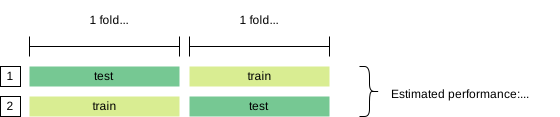
2-fold CV. Although this would effectively split the dataset only once (into two folds), the model will still be evaluated twice and will get to see all data.
Configuring this in Graphext
Configuring this in Graphext
test_size of each iteration.Model tuning and evaluation
Many ML models have so-called hyperparameters that determine exactly how the model learns from data. Basic regression models e.g. fit their coefficients to data such as to minimise a certain loss metric. A regularised regression additionally implements a penalty on the coefficients (e.g. to keep the coefficients small, or to use fewer coefficients if possible). The strength of this penalty is one such hyperparameter. The maximum allowed depth of a decision tree, or the number of decision trees in a random forest are other examples. If you’re lucky, the model in question works well out of the box, with all hyperparameters at their default values. Or if you have a lot of experience training a specific kind of model, you may have some intuition about values that work best in specific scenarios. If neither is the case, or you feel your model could or should perform better than what you’re seeing with the default hyperparameters, you may want to tune them. Tuning here simply means finding their values automatically, and such that the performance of the model is optimised. In practice, this means using data to select the best from a number of candidate models having different hyperparameter values. We may be tempted to simply use the same methodology as explained above to find the best hyperparameters and evaluate our model’s performance. We could e.g. fit 3 different model candidates using k-fold cross-validation and select the one that on average had the best performance. The question then arises what its estimated performance would be on unseen data. If we simply reported the average from our cross-validation, we would be cheating. The estimate would be biased, because we have used the same data to identify the best model (i.e. to select from our candidates and train it), and to estimate its performance. I.e. we haven’t reserved any data to stand in for future, unseen data. The correct way to both tune a model’s hyperparameters and estimate its generalisation performance, is to use nested cross-validation. The general idea is to evaluate the complete training procedure (hyperparameter selection and model fitting) as we would do in a normal cross-validation, but in each iteration of the evaluation, we split the training set again using an inner cross-validation loop to pick the hyperparameters in a robust way. But instead of directly jumping in to this rather complex strategy, let’s build towards it step-by-step starting from simpler strategies.No evaluation (don’t do this) ⛔
As we mentioned above, we don’t recommend fitting or tuning a model without evaluating its generalisation performance. Do this only if you plan to collect more data and evaluate the model later on. Having said that, we can tune a model, using the holdout method or cross-validation, and simply report the same performance we used to pick our hyperparameters as a (bad) estimate of future performance.Holdout method for tuning without evaluation
The simplest method for tuning our hyperparameters would be to use a single holdout set to pick the best from a set of candidate hyperparameter settings:
Holdout tuning without model evaluation. We select a winning hyperparameter setting by training all candidates on a single train split and comparing their performance on a single test split. We report the winner’s performance (or the average across candidates) as our generalisation metric, and then use its hyperparameters to train the final model on all available data.
Configuring this in Graphext
Configuring this in Graphext
tune section to the step’s configuration containing the names and ranges of parameters to explore, like so:validate section in this code snippets is located inside the tune section. This is to indicate that this is the strategy we want to use to select between different hyperparameter settings, not to evaluate generalisation performance. It has the same name validate, because it accepts exactly the same parameters (n_splits, test_size etc.).The above configuration will split the dataset once into 80% of samples to be used to train our hyperparameter candidates, and 20% to evaluate and pick the winner. Any performance metrics reported back in the Models section will be biased and optimistic, since we haven’t reserved any data for testing.Cross-validation for tuning without evaluation
We can also use cross-validation instead of the holdout method to select the model’s hyperparameters without (properly) evaluating its performance:
Cross-validation for tuning without model evaluation. We pick hyperparameters by comparing candidate models using cross-validation on the whole dataset, then train the final model with these hyperparameters using all data. “Estimated” performance is the average performance of the winning model from tuning stage.
Configuring this in Graphext
Configuring this in Graphext
test_size parameter and select the number of splits (n_splits) to be used for cross-validation:Three-way holdout
The simplest strategy to tune and evaluate a model on unseen data is the three-way holdout. This is a simple extension of the holdout method mentioned in the beginning. It splits the dataset once into dedicated training, validation and test sets. This setup is often used in deep learning contexts, where fitting a single model is very expensive but datasets are huge:
Three-way holdout for model tuning and evaluation. A/ Train candidate models (hyperparameter combinations) on train set. Pick winner by evaluating on eval set. Measure performance of winner on test set. This is the estimated generalisation performance. B/ To train final model, first pick a winner again by fitting models to combined train and eval splits and select based on performance on test set. C/ Train the winner on entire dataset as final model.
- fitting our candidate models on the training set
- picking the best candidate by evaluating them using the evaluation set
- calculating the final score of the winning candidate on the test set after having re-fit it on the combined training and evaluation sets
Configuring this in Graphext
Configuring this in Graphext
"n_splits": 1 and selecting the proportion allocated for testing (”test_size”: 0.2, e.g.). Since we want to use a single split to pick our hyperparameters, and a single split again for evaluating, we can combine these in the inner and outer validate sections of the configuration:Holdout cross-validation
Slightly more robust than the previous version, this is essentially the holdout method for model evaluation (dedicated train and test sets), but using cross-validation for tuning by splitting the training set repeatedly (in the previous method we simply split it once):
CV for model tuning and holdout for evaluation. A/ We split the dataset once into test and tuning sets. We select the best hyperparameters using grid search (e.g.) and cross-validation on the tuning set. After being refit again on the whole tuning set, the winner is evaluated on the held out test set. The result is our estimate of generalisation performance. B/ We use the same grid-search with CV approach on the entire dataset to pick our final hyperparameters. sing the best hyperparameters, we fit the final model on the entire dataset.
Configuring this in Graphext
Configuring this in Graphext
"n_splits": 1 and a test_size parameter in the outer validate section. To use cross-validation in the inner loop for hyperparameter selection, provide only the number of desired folds ("n_splits": 5 here):Nested cross-validation
Nested cross-validation addresses the issue of wanting to use cross-validation for both- reliably picking hyperparameters (instead of relying on a single split to select the winner)
- estimating the expected performance of the final model

Model evaluation with hyperparameter tuning. From a higher-level perspective this is just the normal CV. But now, we use each training fold to find the best hyperparameters of our model.
Inner loop
But, how exactly do we select the best model in each iteration of our cross-validation loop? As the name suggests, in nested cross-validation we use an outer loop to evaluate our overall model training procedure, and a second inner loop to select hyperparameters (tuning). I.e. for each outer loop iteration, we split the training set again into k parts, use k-1 parts to fit our different candidates (hyperparameter combinations), and the kth part to evaluate each candidate’s generalisation, like so:
Nested cross-validation. Example of a 5-3 nested CV. In the outer-loop we split the dataset 5 times into two parts: 1/ samples used for testing generalisation performance, and 2/ samples used for tuning our model (i.e. for selecting the best hyperparameters). In a second inner loop, we split the tuning set again 3 times into two parts that are used for 1/ fitting our candidates with different hyperparameters train and 2/ selecting the winner among them using their average performance on the evaluation samples. The winner of the inner loop is then fit again on the whole tune set of the outer loop before being tested on the test set.
Candidate selection
We can zoom further in to get a clearer idea of how the best candidate is selected in each outer loop iteration. Here is one such iteration:
Detail of a single CV outer loop iteration. A single outer fold (tune is used to select between 4 different candidate models (hyperparameter combinations). The candidate with best average performance across all eval folds is selected as the winner. The winning hyperparameter combination is then trained again using all data in the tune fold, and evaluated on the test fold. The whole procedure is then repeated for all outer loop iterations, and the average across all winners on the test folds is our final estimate of the tuned model’s generalisation performance.
{1,10} and values of γ in {scale, auto}. As shown in the figures above, the winner of each outer loop is the candidate with the best average performance across the inner loop evaluation folds.
Final model
As mentioned above, we don’t select any of the winners from our nested cross-validation as our final model. As in the simple case, once we have an estimate of future generalisation performance, we want to make sure we use as much data as is available to fit our final model. Now, keeping in mind again that training our “meta-model” consists of tuning the model’s hyperparameters using cross-validation (the inner loop basically), our final model is trained exactly like that:- Use a single k-fold cross-validation over the whole dataset to pick the best hyperparameters
- Use these hyperparameters to train a single model on all available data
Summary
Schematically, then, the whole procedure of using nested cross-validation for model tuning and evaluation looks like this:
Overview of model tuning and evaluation using nested cross-validation. A/ using nested cross-validation to evaluate the generalisation performance of tuning and fitting the model. B Using the same inner cross-validation on the entire dataset to pick hyperparameters for the final model. C/ Using the best hyperparameters to train the final model on the entire dataset.
- times to estimate performance
- times to select the best hyperparameters
- 1 time to train the final model
Nested cross-validation for coders
Nested cross-validation for coders
GridSearchCV object (which internally uses cross-validation to find the best hyperparameters among a set of candidates). We then use a simple cross-validation to evaluate the meta-model’s generalisation performance, and refit it to the whole dataset to create the final model (also see complete example in scikit-learn):cross_val_score estimates generalisation of our entire model training and selection procedure (the grid-search CV). The final metamodel.fit() (here GridSearchCV’s fit()) then picks the best hyperparameters using the whole dataset, and refits this best model again on the whole dataset.Configuring this in Graphext
Configuring this in Graphext
Evaluation only
If we already have a trained model we may simply want to evaluate it again on new data; perhaps to test whether it still performs as intended, or whether data drift may have led to a degradation in performance. This is not possible at the moment in Graphext, but will be in the future using a dedicated step (something liketest_classification instead of train_classification e.g.).
Summary
We have seen that how to train and evaluate a ML model depends on at least two decisions:- whether to include the selection of hyperparameters in the training (tuning)
- selecting a simple holdout strategy (single split of the dataset intro training and test sets), or a more robust cross-validation (multiple k-fold or shuffle-split iterations).

Summary of recommended model tuning and evaluation strategies. 'Repeated holdout' is synonymous with the 'shuffle-split' method, and nested cross-validation may be of the k-fold or shuffle-split kind.
- To pick a cross-validation strategy (to estimate performance or pick hyperparameters), use
"validate": {"n_splits": n} - To pick a shuffle-split strategy:
"validate": {"n_splits": n, "test_size": x} - The simple holdout method is a special case of shuffle-split using a single split only:
"validate": {"n_splits": 1, "test_size": x}
Stratification
Stratification
References
Conceptual Overview- Model Evaluation, Model Selection, and Algorithm Selection in Machine Learning (Raschka, 2018). Also see complementary notebook.
- On Over-fitting in Model Selection and Subsequent Selection Bias in Performance Evaluation (Cawley & Talbot, 2009).
- Estimating classification error rate: Repeated cross-validation, repeated hold-out and bootstrap (Kim, 2019).
- Cross-validation overview
- Nested versus non-nested cross-validation
- Nested cross-validation chapter in MOOC